20/10/2026 23:14
Does the Finish Look Different? YouTube Visual Enhancements for Cambodian Wooden-Tray Shops

A wooden serving tray can look honey-colored beside a workshop window and reddish on a customer's phone. For a Cambodian shop promoting handmade homeware through YouTube, that difference matters: someone may choose a tray specifically to match a café counter or dining table. Before promoting the demonstration, the shop needs to know what the video can reliably show. YouTube's visual enhancement controls add another consideration to that review. This guide explains how to prepare a useful reference, assess the published appearance and decide whether the content is ready for promotion. The aim is a clear product explanation, with a separate, realistic assessment of any SMM service under consideration.
Start with the buying question the video must answer
In a hypothetical example, a Phnom Penh wooden-tray workshop receives a question from a café owner in Battambang: is the finish pale and matte, or darker with a visible sheen? A dramatic video of the tray moving through sunlight may attract attention while leaving that question unresolved. The workshop should build its demonstration around the finish distinction before considering how widely to distribute it.
Write a short acceptance statement for the video: a viewer should understand which finish is shown, how its surface reflects light and how to request confirmation of the available piece. Treat exact color matching as a separate conversation. This keeps the filming brief manageable and gives the reviewer something more useful than an instruction to make the tray look attractive. It also identifies which visual differences would matter commercially.
Understand what YouTube's enhancement setting controls
YouTube says it may automatically enhance some videos, including adjustments to brightness, color, sharpness and resolution. Enhancements are not applied to every video. On a computer, open YouTube Studio, then Settings, Channel and Advanced settings. Check or uncheck the option labeled Let YouTube enhance visual quality, then save. Audio has a separate control. These settings govern future uploads; they do not affect existing uploads or ads. See YouTube's official [Video & audio quality enhancements guidance](https://support.google.com/youtube/answer/16619284?hl=en).
For a shop whose demonstrations depend on subtle finish differences, consider disabling visual enhancements before uploading the next reference demonstration. This is an editorial choice, not a guarantee of color accuracy. Record the decision beside the filming brief so the person preparing the upload knows which approach was approved. Avoid changing a channel preference casually when other staff also prepare content.
Build a physical reference before touching the edit
Select the actual tray being demonstrated and assign it an internal reference that staff can recognize. Keep the finish name, product dimensions and filming date together. If the video shows a representative sample rather than the piece a customer will receive, say so clearly. Natural grain variation should not be mistaken for an editing problem or a promise that every tray will look identical.
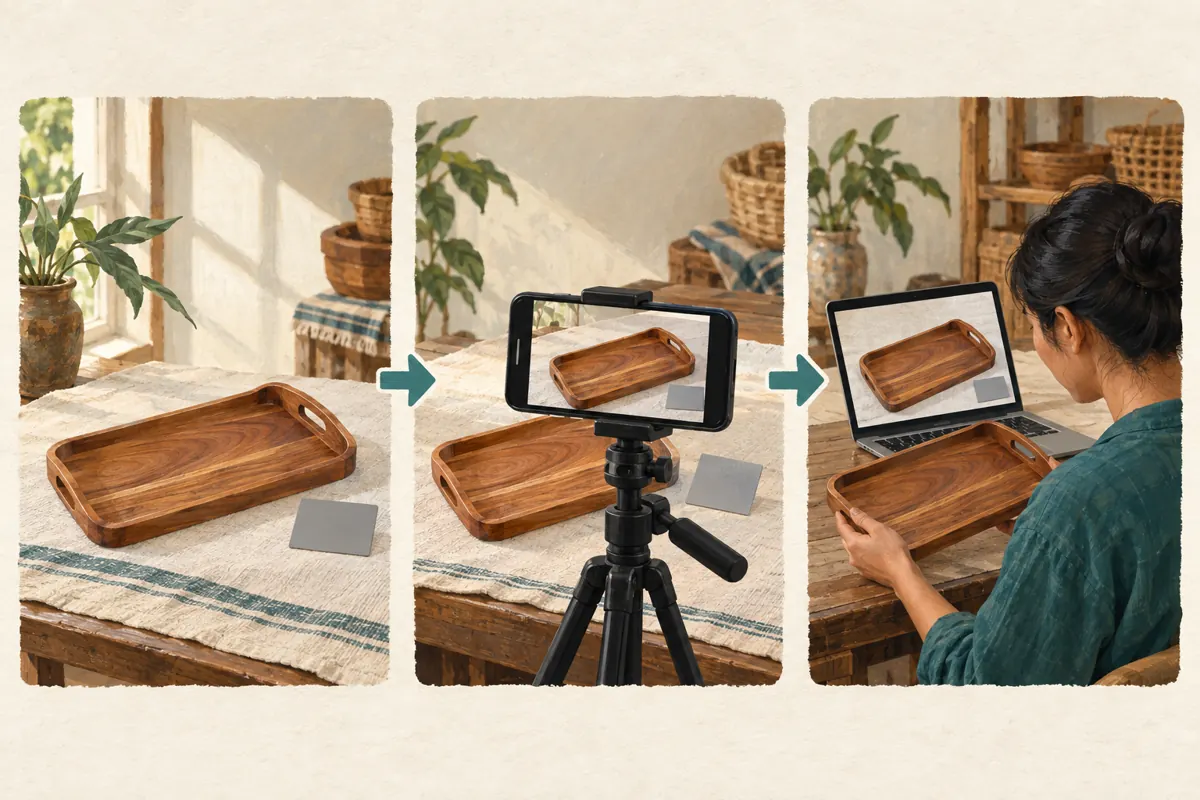
Film a short reference shot beside a neutral gray card under steady, soft light. The card provides a comparison point; it does not turn an ordinary phone into a calibrated measuring instrument. Avoid changing lamps or moving between direct sun and shade during the same comparison. Keep the original recording. If an exported version later looks unusually orange, the team can compare it with the reference instead of relying on memory.
Show sheen through movement without hiding the surface
Use three deliberate views: the whole tray at rest, a slow tilt that reveals reflection, and a closer view of the grain and rim. Keep the camera steady enough that the movement belongs to the product. A small tripod or stable support helps the reviewer distinguish surface detail from camera movement. Leave each view visible long enough for a shopper to understand it.
Do not wet or oil the surface simply to make the recording look richer unless that treatment is part of the product condition being explained. Remove decorative objects for the reference views so shadows do not conceal the finish. A styled café scene can follow, but the product explanation should remain understandable without it. These choices help viewers assess what they are seeing rather than guess which visual effects come from the tray.
Separate capture, editing and playback problems
When a finish looks wrong, compare three things in order: the physical tray under the reference light, the original recording and the exported video. If the original already looks too warm, revisit the filming setup. If only the export changes noticeably, inspect the editor's adjustments and export workflow. Do not compensate for an uncertain problem by repeatedly adding opposite color effects.
After uploading, allow the intended viewing quality to become available before judging fine grain. YouTube explains that uploads initially process in lower quality, with higher resolutions becoming available afterward. Consult its [Low video quality after upload guidance](https://support.google.com/youtube/answer/71674?hl=en). Then review the same moment on the same device under similar conditions. A difference between two unrelated shots is weak evidence of a platform change, particularly when the tray angle, room lighting or screen brightness also changed.
Use a small review that can produce a clear decision
Ask one colleague who did not edit the video to describe the finish without first hearing your preferred answer. Have them identify the tray, describe whether the surface appears matte or reflective, and explain how they would confirm the available item. Review once on the shop's usual phone and once on another available screen. This is a practical check for obvious ambiguity, not a scientific display comparison.
Use three outcomes. Approve when the demonstration supports the product description. Revise when an angle, exposure choice or edit creates a misleading impression. Hold when staff cannot identify the demonstrated finish or available stock. In the hypothetical workshop, a reviewer describing a matte tray as highly glossy would trigger another look at the reflection shots. Record the specific misunderstanding rather than writing only that the video failed review.
Give Cambodian buyers a useful confirmation route
State the finish name in the language your intended customers understand, and keep it consistent across the spoken explanation, caption and staff replies. For Khmer-speaking buyers, have a fluent colleague check the wording used for sheen and shade. A supplier's English finish label can remain as a reference, but it should not replace an understandable explanation of the visible surface.
A hypothetical caption could explain that the video shows a sample finish and invite buyers to request a current-stock photo or inspect a sample before confirming a close color match. Offer only confirmation methods the shop can actually provide. A buyer outside Phnom Penh may need photographs of the available piece; a nearby buyer may prefer a physical sample. Neither method should be presented as proof that every screen displays the same color.

Evaluate an SMM listing separately from content readiness
The supplied catalogue includes the exact public service name “YouTube Subscriber ~ Max 100k ~ 50-150/days ~ Instant ~ 𝐍𝐎 𝗥𝗘𝗙𝗜𝗟𝗟”. Its title identifies a subscriber offering, but the supplied description is empty. Treat the quantity, timing and other wording as listing claims rather than independently verified facts. Nothing in that description establishes Cambodian viewers, interest in wooden trays, a compliant delivery method or official YouTube affiliation.
YouTube prohibits artificial increases in engagement metrics and warns that a hired promoter's actions can affect a channel. Review its [Fake engagement policy](https://support.google.com/youtube/answer/3399767?hl=en) before considering a provider. Decline methods that artificially inflate engagement. Purchased engagement is not evidence of genuine interest, sales, ad delivery or Cambodian users. A polished demonstration does not resolve those limitations, and a subscriber count cannot tell the workshop whether customers understood the finish.
Promote the approved explanation and record useful responses
Once the demonstration passes review, share it where the explanation is relevant: the shop's own product information, a response to a genuine finish question or a permitted community discussion. Give the link a clear description, such as a demonstration of the available matte finish. Avoid describing it as an exact color reference when the filming and viewing conditions cannot support that promise.
Keep a small response log focused on misunderstandings. Useful entries include a customer asking whether a reflection means the tray is varnished, requesting the specific piece shown or confusing two finish names. These observations can guide a revised demonstration. Record confirmed orders separately and retain uncertainty about how customers discovered the shop. A change in views during promotion does not establish that the video caused a purchase or that its product explanation became clearer.
Avoid fixes that create a second problem
Do not warm every shot because one phone looks cool, or sharpen the grain until the surface appears rougher than it is. Avoid choosing a heavily edited thumbnail that creates a different finish expectation from the video. Keep the cover frame, demonstration and product wording aligned. If the thumbnail is decorative, the opening explanation still needs to identify the actual finish being offered.
Do not treat a general warning about screen differences as permission to retain a visibly misleading demonstration. Correct the avoidable problem first. If the available batch changes, review whether the old sample still represents the offer. Keep a brief note identifying the approved video, sample and finish description so another employee can answer questions consistently. The practical standard is whether the content helps buyers ask an informed next question without quietly promising more than the shop can confirm.

Frequently asked questions
Should every Cambodian wooden-tray shop disable visual enhancements?
There is no universal editorial answer. Consider how much the video depends on small visual distinctions. A workshop introduction and a close comparison of two finishes serve different purposes. For finish-sensitive content, controlling the source recording carefully and reviewing the final appearance should take priority over making the image more striking.
Will changing the setting repair a demonstration already uploaded?
No. YouTube describes the preference as applying to future uploads. For an existing demonstration, first identify the actual problem and whether it affects the buying decision. If the video materially misrepresents the product, prepare an accurate replacement and update the references you control rather than assuming a preference change repaired it.
Can a gray card guarantee an exact match on a customer's phone?
No. It provides a useful reference within the filming and review process, but it cannot control another person's display or viewing environment. If matching an existing table or counter is essential, discuss a physical sample or another suitable confirmation process. Explain what the shop can confirm before accepting a match-dependent order.
What should staff do when a buyer says the delivered tray looks darker?
Identify the ordered finish and the actual piece supplied, then compare the buyer's concern with the approved product information. Ask for relevant photographs without assuming the customer used an unsuitable screen. Investigate whether stock variation, the demonstration or a picking mistake contributed, and follow the shop's stated resolution process.
What is a useful success measure for this workflow?
Look for clearer product conversations: buyers can name the finish, distinguish the sample from current stock and understand how to confirm their choice. Track recurring confusion and whether revisions address it. These are practical review signals, not proof of revenue impact. Subscriber purchases or larger view totals cannot substitute for that evidence.
Explore the current service catalogue, create an account, or ask a specific question through support tickets.
- YouTube Help: Video & audio quality enhancements
- YouTube Help: Low video quality after upload
- YouTube Help: Fake engagement policy
Prepared with AI assistance. Illustrations explain the workflow and do not represent customer results.